
When it comes to controlling and monitoring your 3D printer remotely, OctoPrint is the most popular open-source software out there, but it’s not the only one. Whether you’re looking for a more user-friendly interface, better security features, or additional functionalities, other great alternatives might suit your needs better.
The best alternatives to OctoPrint are AstroPrint, Repetier-Server, MatterControl, Duet Web Control, OctoEverywhere, and 3DPrinterOS are all great alternatives to OctoPrint.
OctoPrint is a great option for many people, but it has its limitations. Some users find it too complex or doesn’t have the features you’re looking for. Maybe you’re looking for a solution that integrates more seamlessly with your workflow, or perhaps you need better support for a specific 3D printer model. Let’s look at some alternatives to help you find a solution.
OctoEverywhere
Before you disregard OctoPrint, let me tell you about OctoEverywhere, an extension that enhances OctoPrint by providing secure, remote access from anywhere. It’s perfect for those who love OctoPrint but need better remote capabilities.
There’s an OctoEverywhere app for your phone to make everything easy without needing to set up a complex network. They use secure connections to keep your data and printer controls safe from unauthorized access and are trusted by the majority of the community.
Real-time monitoring is easy to set up and you can set notifications to be sent at certain stages of the print. The support is decent and the community is large enough to help you out with any queries.
If you’re still not convinced, let’s look at these fantastic OctoPrint alternatives.
AstroPrint
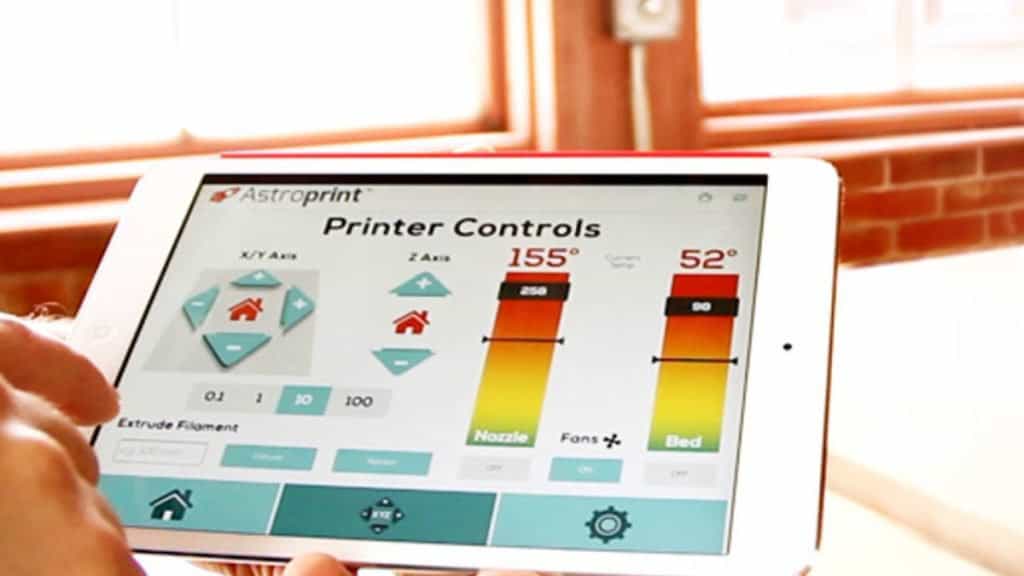
AstroPrint is a cloud-based 3D printing management platform that offers a user-friendly and streamlined experience for managing your 3D printer. AstroPrint provides a mobile-friendly interface that works seamlessly across various devices and screen resolutions.
It’s a fully-cloud-based slicing and model repair program that you can use for remote monitoring and other control over your prints.
The integrated marketplace for models and prints is impressive and there’s full support for multiple printers and cameras. The mobile app for on-the-go management works perfectly and makes things easy to use even on a phone screen.
The platform does offer a free plan, so it doesn’t cost anything to try it out for yourself. It’s just a bit limited in terms of customization options.
AstroPrint is a great option for those looking for a user-friendly and cloud-based 3D printing management solution. It’s easy to set up and has a great community-driven marketplace. The remote monitoring and printer controls work perfectly and the program is highly scalable and flexible depending on what you need.
Repetier-Server
Repetier-Server is another trusted solution for managing multiple 3D printers. It offers detailed controls and is highly customizable, making it a favorite for some advanced users.
This program is specifically designed for multi-printer setups so if that’s your entire goal, Repetier-Server might be the right choice for you. It has features like job queuing, scheduling prints, and detailed performance monitoring.
User authentication and role-based permissions secure access and control to make sure nothing can be done without your consent.
This software works with all the main platforms like Windows, macOS, and Linux, so you won’t have any issues no matter what you’re using.
MatterControl
MatterControl is extremely powerful because it integrates, slices, and designs within the same program. It basically has a built-in CAD design tool for all that so you can get everything done in one place.
The UI is easy to navigate and I didn’t battle to find all the normal features you’d expect from the software. It’s compatible with all the major operating systems and includes a huge library for managing design files, print settings, and profiles.
With cloud syncing available, you don’t have to worry about setting everything up every time you use a different device to connect with.
Duet Web Control
Duet Web Control is a web-based interface specifically designed for Duet 3D printer controllers. So if you have one, keep reading, otherwise, move on to the next alternative if you have a different printer.
This is the perfect platform for you if you’re using a Duet 3D printer because it’s specifically designed for Duet3D electronics. This means you’ll face fewer problems and gain increased performance and control.
Of course, you’ll have access to real-time control and precise temperature management, in fact, it even offers motor tuning and bed leveling. Everything is on a web-based interface so accessible with any device that has a browser.
Live camera feed works perfectly and detailed status updates and print progress can be set up as well.
Duet Web Control has macro support so you can create and execute macros for repetitive tasks.
It’s fair to say that DWC is perfect for anyone using Duet hardware, everything works perfectly on the default settings for beginners while advanced users have a massive amount of options with configuration settings if they want to fine-tune things.
3DPrinterOS
3DPrinterOS is another cloud-based operating system that’s well put together and has a premium feel to it. It offers a wide range of features for hobbyists to professional 3D printing institutions.
3DPrinterOS operates entirely in the cloud so you can manage your 3D printers from anywhere with an internet connection. This eliminates the need for dedicated local hardware and offers flexibility in managing printing tasks.
It has an intuitive and easy-to-navigate interface. You can upload, slice, and print your 3D models with minimal effort, making it a viable solution for beginners and advanced users.
3DPrinterOS supports the management of multiple 3D printers simultaneously. This is particularly useful for businesses and educational institutions with multiple machines.
You can monitor your print jobs in real-time, including live camera feeds and detailed status updates. This feature helps address any issues that may arise during the printing process.
The platform integrates advanced slicing tools that allow for detailed customization of print settings. You can optimize your prints for quality, speed, or material usage according to your needs.
It’s easy to collaborate on projects and you can share designs and print settings with team members, facilitating teamwork and project management.
The platform prioritizes security, offering encrypted connections and robust data privacy measures to protect user information and intellectual property.
The only downside is that the free trial is limited but at least you can take a look before subscribing to the service.
Klipper
Klipper is an advanced 3D printer firmware that leverages the computational power of a host computer, typically a Raspberry Pi, to enhance the performance and capabilities of 3D printers.
Klipper offloads the computational workload from the printer’s microcontroller to the host computer. This allows for more complex calculations and algorithms so you get faster print speeds and improved print quality.
The software supports precise stepper motor control, enabling smoother movements and more accurate prints.
Klipper uses a simple, text-based configuration file that makes it easy to set up and modify printer settings.
It has features such as pressure advance, input shaping, and automatic bed leveling, which contribute to better print quality and easier printer management.
There is a strong and active community around Klipper that offers extensive documentation, forums, and support to help users with setup and troubleshooting.
Klipper is compatible with a wide range of 3D printers and can be used with multiple types of control boards so it will most likely work with your printer.
Comparing Features and Usability
Every option has its strengths and weaknesses. AstroPrint’s cloud-based system is incredibly user-friendly, while Repetier-Server’s customizable options cater to advanced users. MatterControl’s all-in-one approach is perfect for those who want simplicity, and Duet Web Control is unmatched for users with Duet controllers. OctoEverywhere enhances the existing OctoPrint experience with better remote access.
Mobile and Web App Availability
If I had to choose a couple of options with the best mobile experiences, I’d say AstroPrint and OctoEverywhere offer robust mobile and web apps, they really make remote management easy to navigate. Repetier-Server and Duet Web Control provide web-based interfaces that work fine but aren’t the best on tiny screens. MatterControl has a desktop app with the potential for mobile control through third-party apps.
Security Considerations
Security is crucial when managing 3D printers remotely. AstroPrint and OctoEverywhere emphasize secure connections, making them excellent choices for users concerned about safety. Repetier-Server and Duet Web Control also offer robust security features, though their complexity might be a barrier for some.
Cost Analysis
AstroPrint offers both free and paid options, with premium features behind a paywall. Repetier-Server and Duet Web Control are generally free but might require investment in specific hardware. MatterControl is free, making it a cost-effective choice for many users. OctoEverywhere offers a free tier with optional paid features for enhanced functionality.
Ease of Setup
AstroPrint and MatterControl are known for their straightforward setup processes, making them ideal for beginners. Repetier-Server and Duet Web Control, while powerful, require more technical know-how to set up. OctoEverywhere is easy to install, especially for those already using OctoPrint.
Performance and Reliability
Performance is a critical factor in choosing a 3D printer management software. Duet Web Control is highly reliable for Duet users, while AstroPrint’s cloud-based nature ensures stable performance. Repetier-Server offers robust performance but may be complex to manage. MatterControl provides a balanced approach with good reliability, and OctoEverywhere enhances OctoPrint’s performance with secure remote access.
Compatibility with 3D Printers
AstroPrint and MatterControl support a wide range of 3D printers, making them versatile choices. Repetier-Server and Duet Web Control are more specialized, with the former supporting multiple printers and the latter focusing on Duet controllers. OctoEverywhere works seamlessly with OctoPrint-compatible printers.
User Experience and Community Feedback
AstroPrint stands out with its user-friendly interface. Repetier-Server is appreciated for its advanced features. MatterControl’s integrated solution is popular among users seeking simplicity. Duet Web Control is optimized for Duet users making it reliable, and OctoEverywhere is valued for enhancing the OctoPrint experience.
Customization and Extensibility
Regarding customization and extensibility, Repetier-Server and Duet Web Control offer extensive customization options, while AstroPrint and MatterControl focus more on user-friendly interfaces. OctoEverywhere adds valuable extensions to OctoPrint so it’s also highly customizable.
Integration with Other Tools
AstroPrint integrates well with cloud services and slicing tools, while Repetier-Server supports various slicers. MatterControl combines slicing and management in one app, and Duet Web Control offers seamless integration with Duet hardware. OctoEverywhere enhances OctoPrint’s capabilities with secure remote access.
Mobile and Web App Availability
If I had to choose a couple of options with the best mobile experiences, I’d say AstroPrint and OctoEverywhere offer robust mobile and web apps, they really make remote management easy to navigate. Repetier-Server and Duet Web Control provide web-based interfaces that work fine but aren’t the best on tiny screens. MatterControl has a desktop app with the potential for mobile control through third-party apps.
Conclusion
So it really just depends on what your specific requirements are. Whether it’s a user-friendly interface or advanced customization options, there’s a suitable option for all that. Consider the level of technical expertise required for setup and operation.
Some alternatives offer straightforward, beginner-friendly interfaces, while others provide more complex features suited for advanced users. Additionally, think about whether you prefer cloud-based solutions for remote access and management or locally hosted software for greater control.